TypeScript 0 stars 0 forks 349 KBLast push
libs
Automated NPM Library Publishing Template 🚀
- angular
- angular-library
- automation
- ci-cd
- gh-act
- github-actions
- library-template
- local-testing
- npm
- npm-publish
Automated NPM Library Publishing Template 🚀
This branch serves as a template for automating the process of publishing libraries to NPM. You can add a new library and configure a dedicated GitHub workflow to handle its publishing seamlessly.
Additionally, you can run GitHub Actions locally using the gh act extension for easier testing and debugging.
Features ✨
- Template for multiple libraries: Easily add and manage new libraries for automated publishing.
- GitHub Actions integration: Configure workflows for automatic builds and publishing.
- Local Action testing: Test and debug workflows on your local machine before pushing changes.
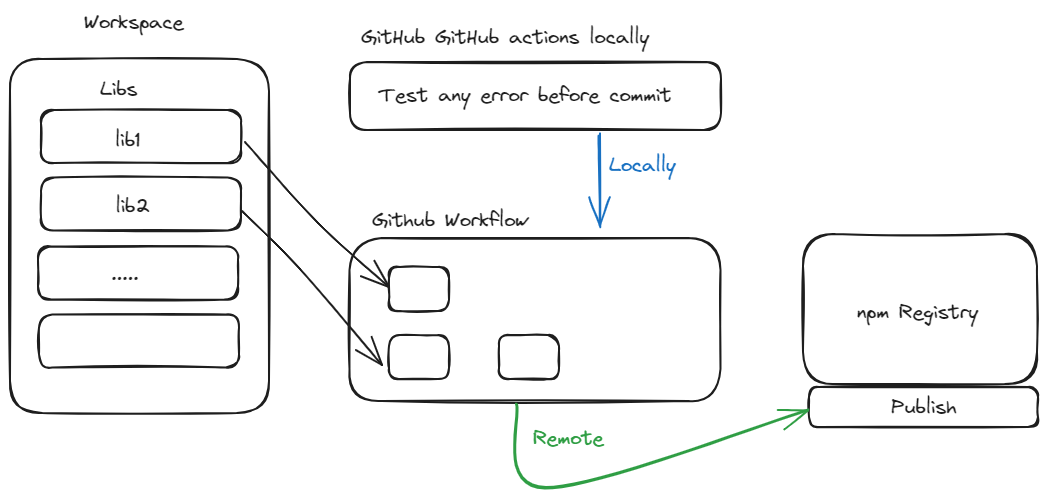
Run GitHub Actions Locally 🚀
To run workflows locally, you need to install the gh act extension see gh-act.
After installation run:
gh act -j 'job-name' --pull=falseAdding a New Library 🛠️
- Create the library: Add your library under the appropriate folder in the repository.
- Write a workflow: Define a GitHub workflow for the library, specifying its build and publishing steps.
- Test locally: Use gh act to ensure your workflow is correctly configured.
- Push to the repository: The workflow will automatically trigger on the appropriate events (e.g., pushes to main).
How to Recreate This Workspace 🛠️
Follow these steps to set up a new workspace and libraries from scratch:
Step 1: Initialize a New Folder
Create a new folder for your workspace:
mkdir my-workspace
cd my-workspace
git init
Step 2: Create Angular Library
Run the following command to create an Angular workspace without a default application:
ng new my-workspace --no-create-application
cd my-workspace
ng generate library my-lib